
Have a Question?
How to Set a Product as Preorder
Setting a Product as Preorder allows customers to purchase items that are currently out of stock or not yet available. The purpose of enabling preorders is to capture sales in advance, gauge demand, and secure customer orders before restocking. It also informs customers of expected availability, helping businesses maintain revenue flow and customer engagement even when products are temporarily unavailable. To set a Product as Preorder:
1. Create or Modify Product:
- You can either create a new product or modify an existing product’s settings to set it as a preorder.
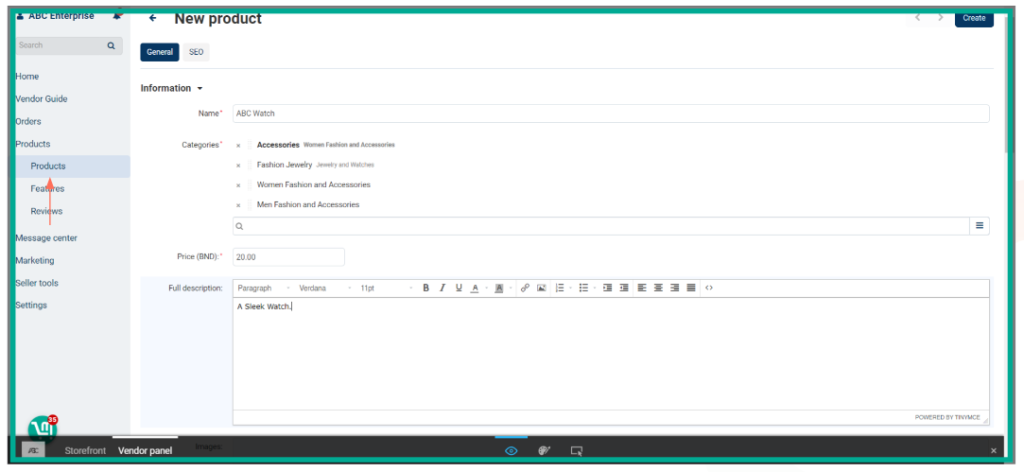
2. Then, Scroll down and you can see the ‘Availability’ section.
3. Set to Buy in Advance:
- Under Out of Stock Actions, select ‘Buy in advance’ to allow the product to be available for backorder even when out of stock.

4. Add Pre-order Information:
- In the Pre-order Warning section, specify how long it will take for the product to arrive or be restocked.

5. Customize & Save:
- Click ‘Create’ or ‘Save’. You can also customize the color of the pre-order warning label for better visibility to your customers.
Note: All products that are uploaded will be reviewed by an administrator, and you’ll receive a notification in your Admin Panel within 1-3 days regarding approval or disapproval.