
Have a Question?
How to set pickup option as a shipping method
Setting up Pickup Location as a Shipping Method allows customers to choose self-pickup for their orders. By selecting “Pickup from store”, customers will see your available store locations at checkout. You can customize the shipping method with your store name and logo, and all configured locations will appear as pickup options without requiring shipping rate setup. This method offers a convenient alternative to shipping, giving customers flexibility in how they receive their orders. To set pickup option as a shipping method:
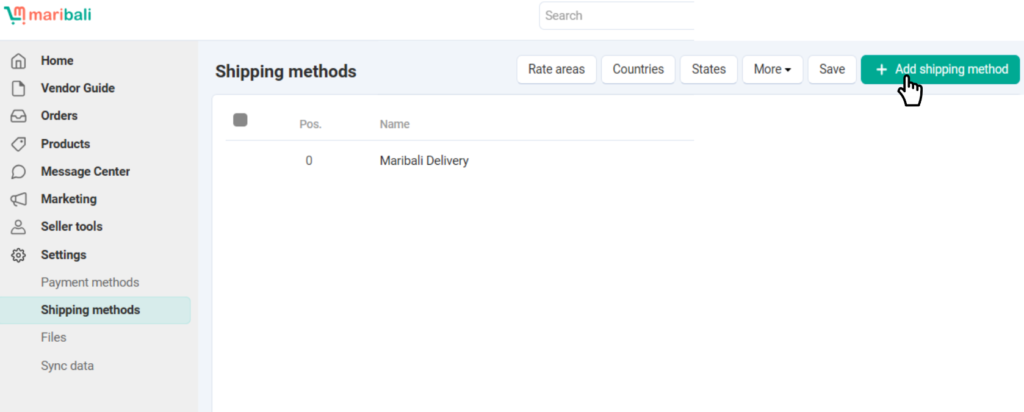
1. Add Pickup Location to Shipping Method:
- Return to the Shipping Method page and add a new shipping method with the created pickup location.
2. Select Pickup Option:
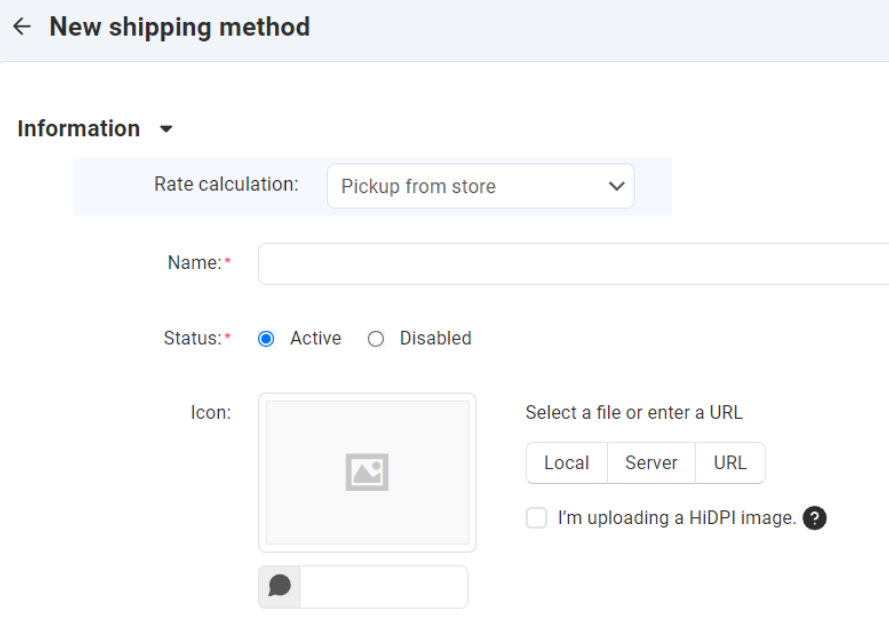
- Choose “Pickup from store” as the shipping method.
3. Enter Store Information:
- For Name, enter your company or store name.
- When customers choose self-pickup, the pickup locations you previously set will appear under this option.
4. Optional Logo Upload:
- You can upload your store logo in the icon area if desired, but it’s optional.
5. Create the Shipping Method:
- Click Create once all information is entered.
You will see a few tabs created. However, since this is a pickup option, you do not need to set any shipping rate and test the rate calculation.

All the pickup location(s) you have added will be shown to your customers at the checkout page.
6. Edit Pickup Locations:
- To make changes, go to Shipping Methods > More > Stores.
